Overview
Tracer turns SWE tasks into agent trajectories and, optionally, ready-to-train SFT data.
It is the trajectory-generation stage of the
LegoFlow pipeline, sitting
between task curation (curator) and model training (trainer). It runs a
coding agent in reproducible containers, captures each rollout, and can convert
successful trajectories into SFT data. One config.yaml pins the
Harbor and swe_data_process runtimes and
declares every external input and downstream output.
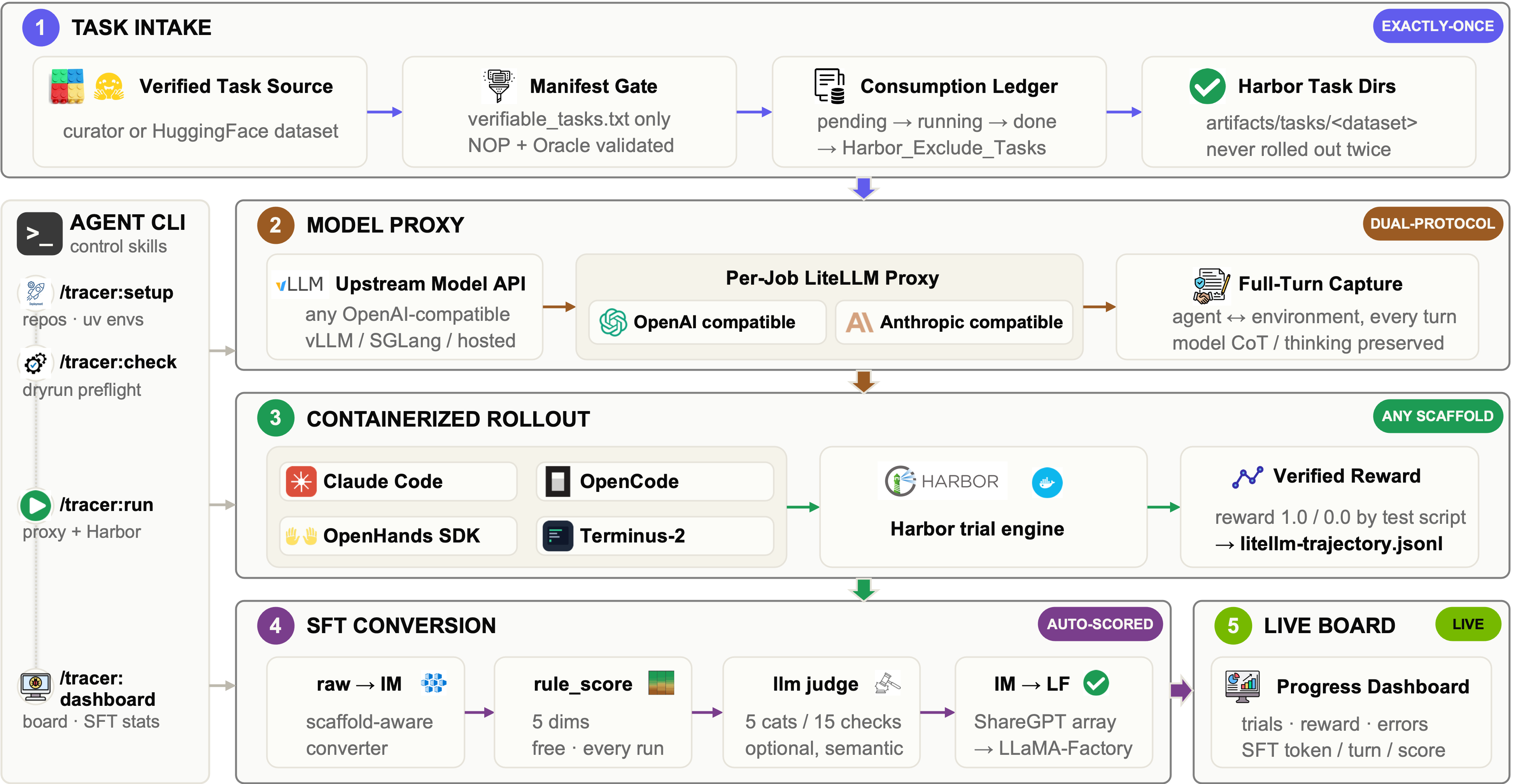
A run works through the diagram above from left to right. Tracer picks up the tasks Curator has verified, skipping any it has already run. For each task it starts a container, puts a coding agent inside it, and lets the agent work until it succeeds, fails or runs out of time. The agent's model calls go through a proxy, which is what records the conversation turn by turn.
What comes out is one directory per task holding two things: whether the task's own tests passed, and the complete trace of how the agent got there. From those, you can score the rollouts, convert the good ones into training data, and watch all of it on the dashboard.
Tracer provides:
- Curator and Hugging Face task sources. Local Curator output is filtered by
verifiable_tasks.txtwhen present, and compatible Hugging Face task packages can be staged directly. - Processed-task protection through a ledger of terminal tasks.
start.shturns that ledger into Harbor exclusions on the next launch. - A per-job LiteLLM proxy in front of your model API, with OpenAI- and Anthropic-compatible endpoints.
- Containerized rollouts through Harbor, with configurable concurrency, retries, and timeouts.
- Configurable rollout agents. The default is a pinned custom Claude Code preset, with custom OpenCode and OpenHands alternatives when all preset fields are aligned.
- Multi-scaffold SFT conversion for Claude Code, OpenCode, OpenHands SDK, and Terminus-2, with TQS V2 rule scoring and optional LLM scoring.
- A progress dashboard you can preview locally or publish to Cloudflare Pages.
Where to go next
- Getting Started: operate through the plugin or run the underlying commands.
- Design: understand task intake, proxying, rollout, conversion, and dashboard flow.
- Usage: read about conversion, scaffolds, scoring, and LiteLLM proxy details.
- Dashboard: monitor progress locally or online.